REVERFIT
Reverfit’s workout app

Your plan,
set by set

The weight and reps you really do, not the ones you planned. Your bests, the kilos you’ve moved and the map of what you’ve worked, always at hand.

Logging your workouts is free and has no ads. You use it without signing up, with no expiry and no card. There’s a paid Pro that adds Hugo and Nora’s videos in cardio, the weight for each set, the muscle map for the week and the month, your curves and your bests, your whole history, the plate calculator, the heart rate strap, unlimited plans and CSV export. The yearly plan comes with a 7-day trial from your phone’s store, with your payment method, and you cancel it from there before it ends.
Without an account, what you log stays on your phone. The app is in English and Spanish.

This is Reverfit Workout.

The same screens you see on the App Store and Google Play.

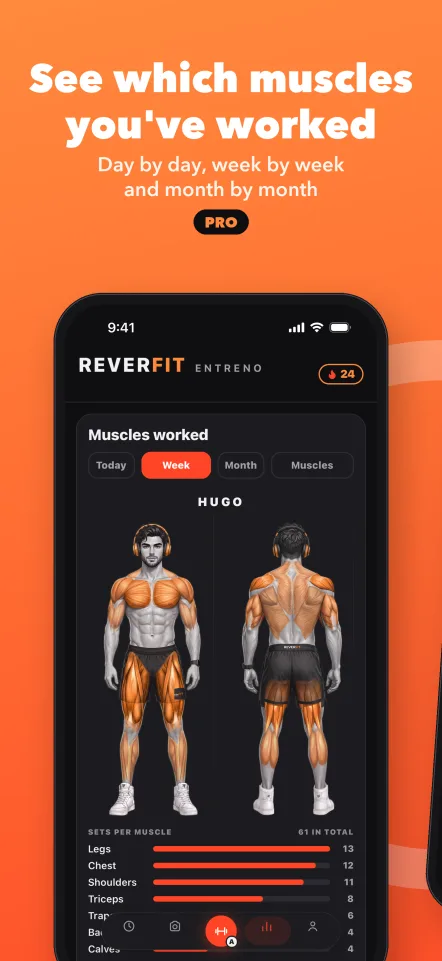
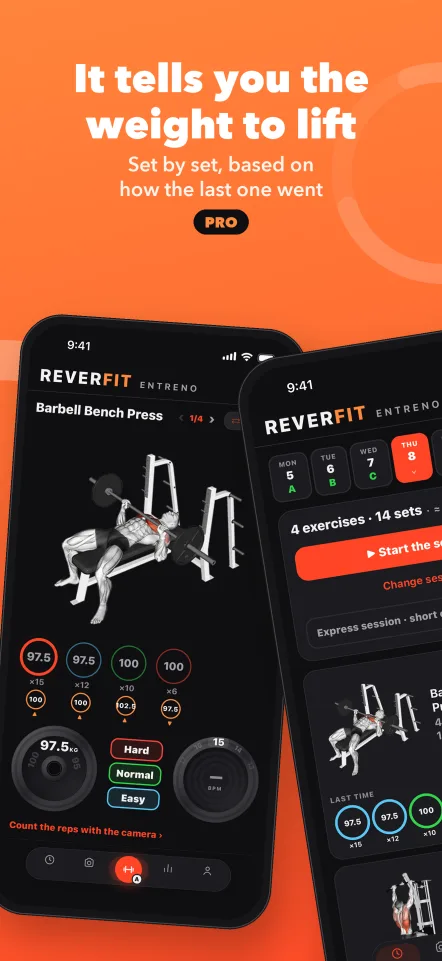
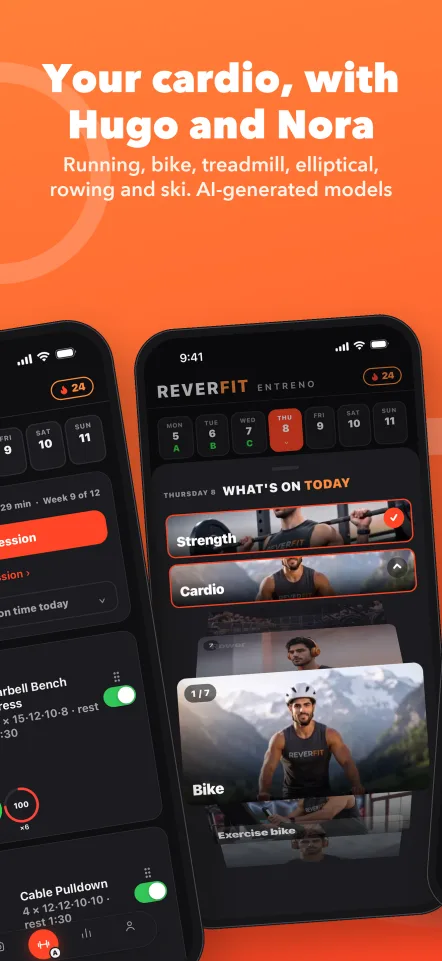
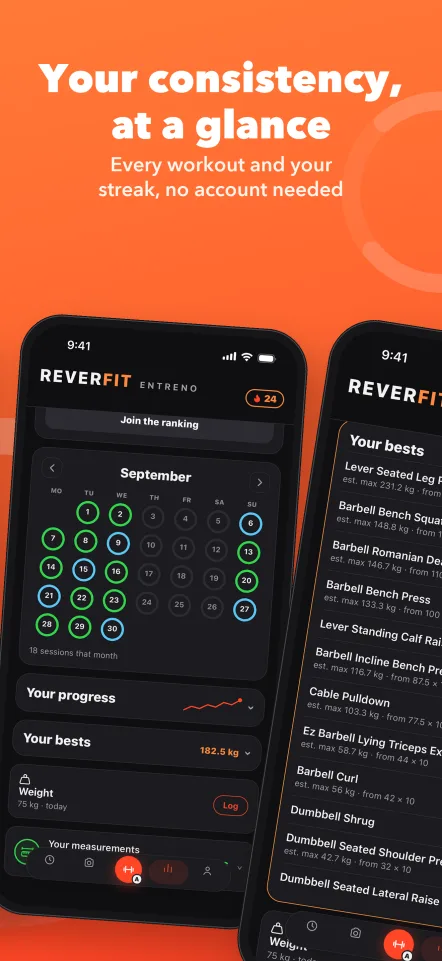
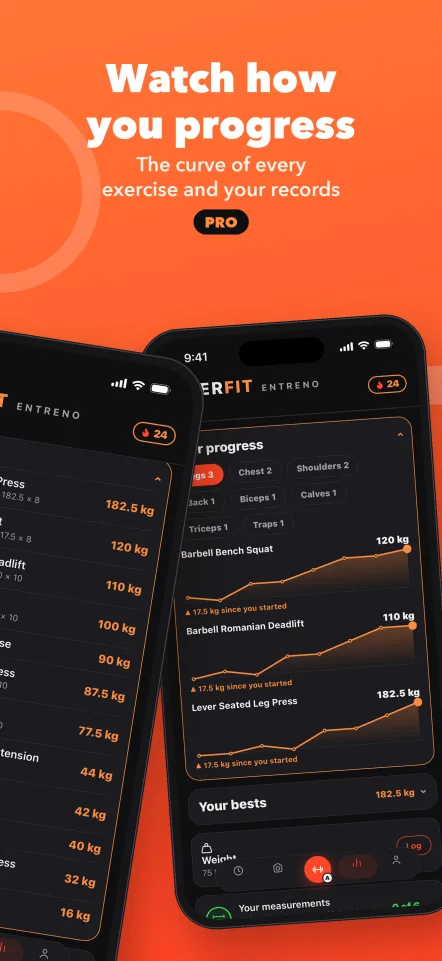
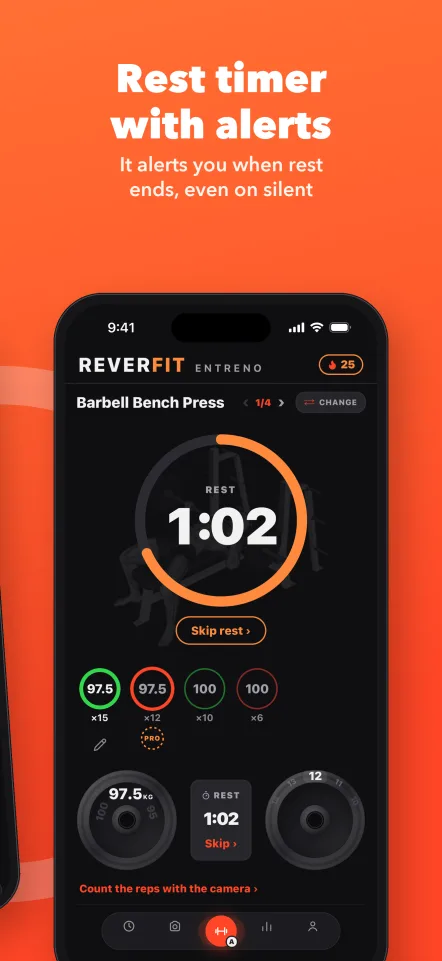
See which muscles you've worked: day by day, week by week and month by month. ProIt tells you the weight to lift, set by set, based on how the last one went. ProYour cardio, with Hugo and Nora: running, bike, treadmill, elliptical, rowing and ski. AI-generated modelsYour consistency, at a glance: every workout and your streak, no account neededWatch how you progress: the curve of every exercise and your records. ProRest timer with alerts: it alerts you when rest ends, even on silent

Inside, screen by screen.

Scroll slowly: each sentence changes the phone's screen.

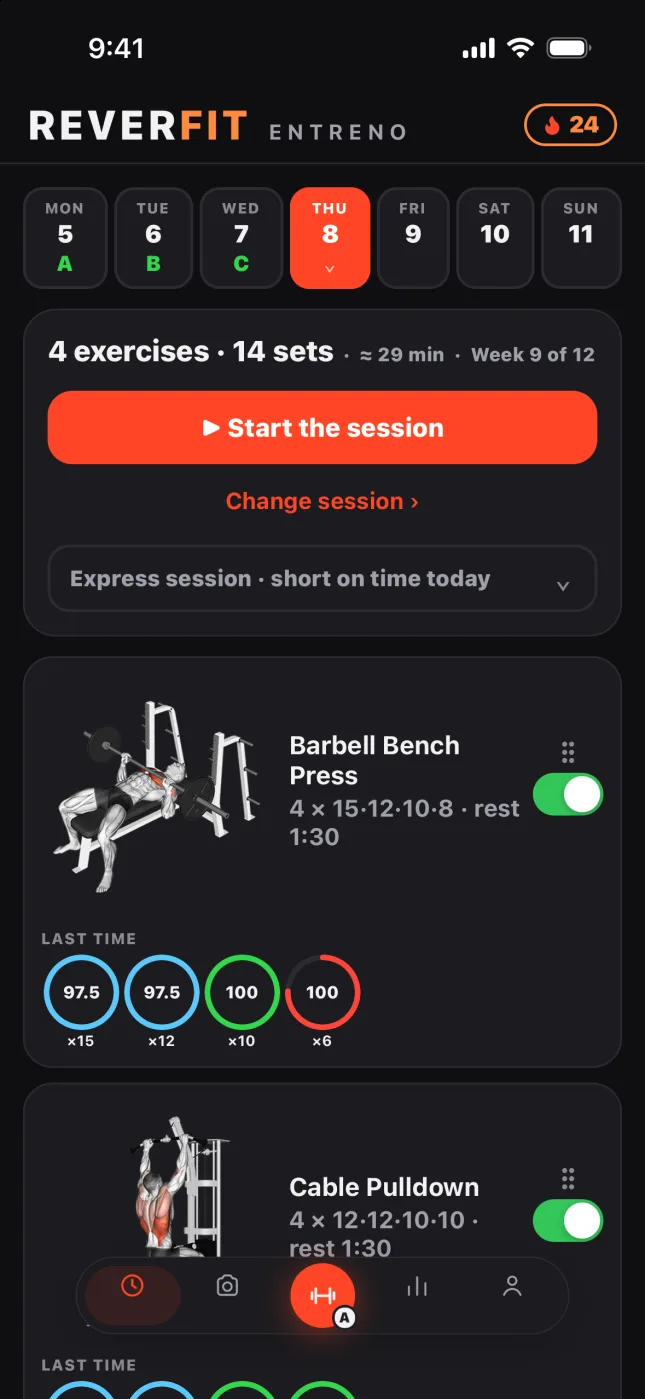
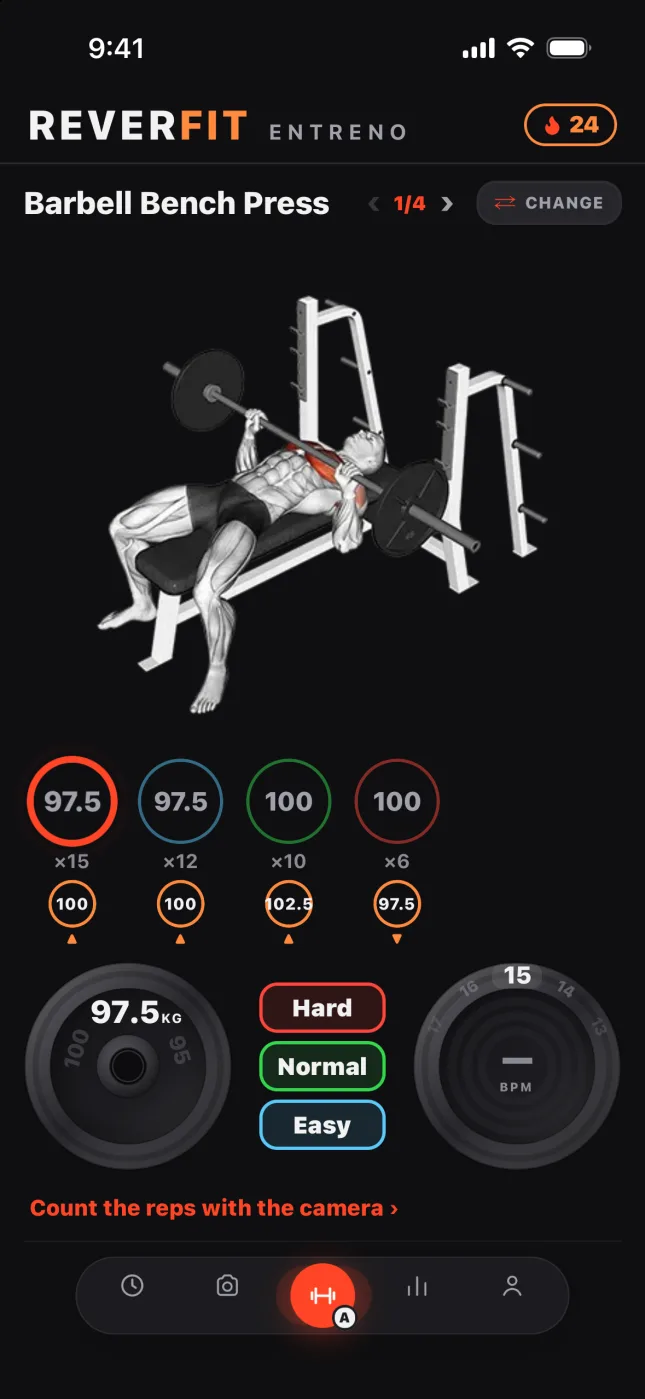
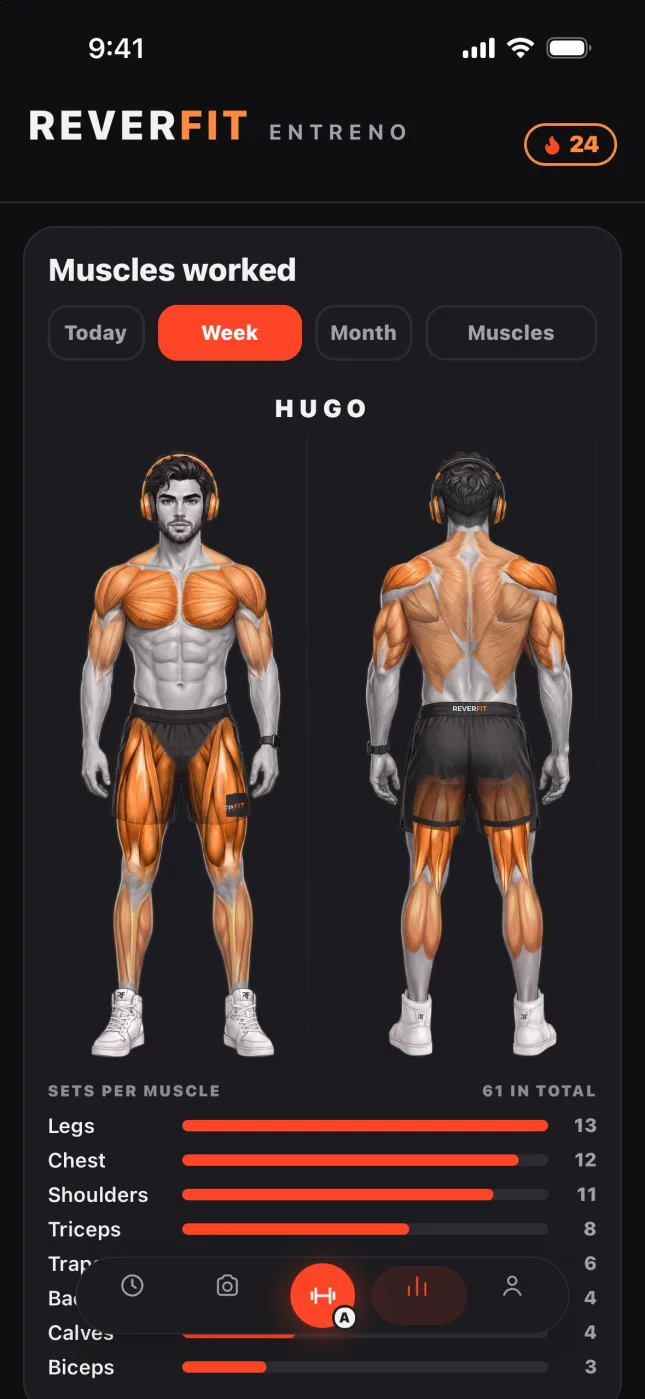
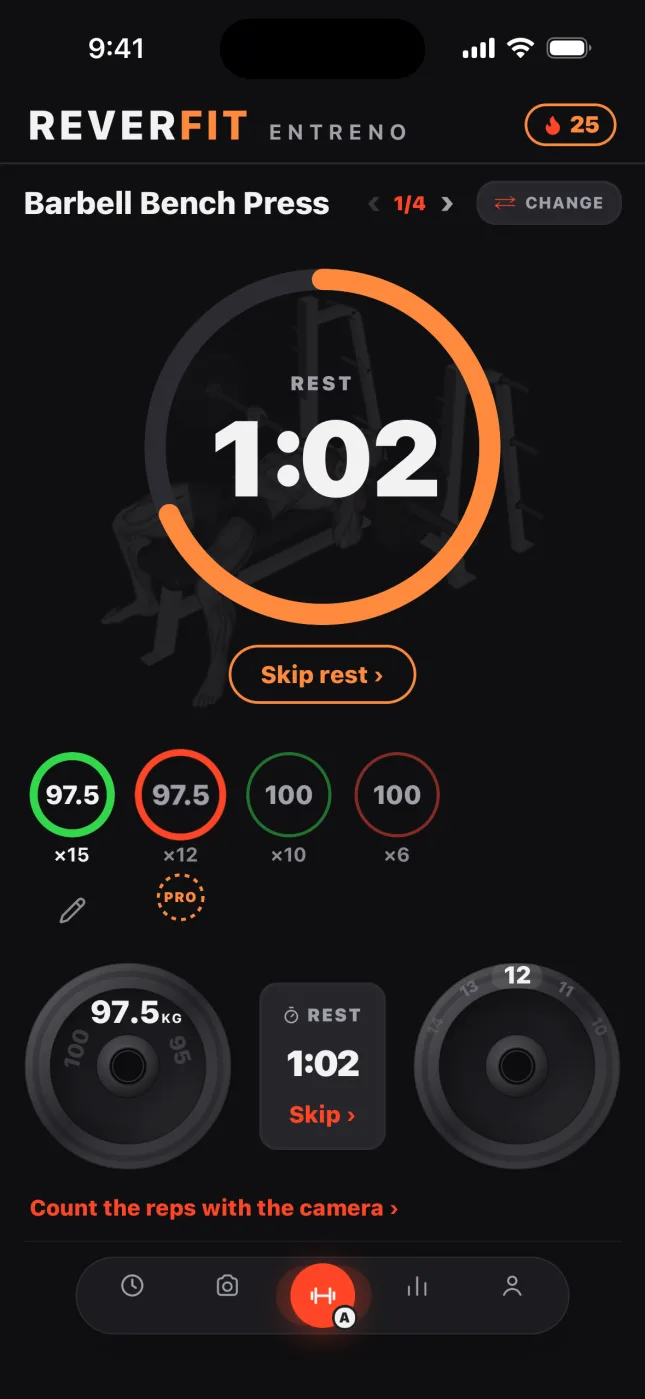
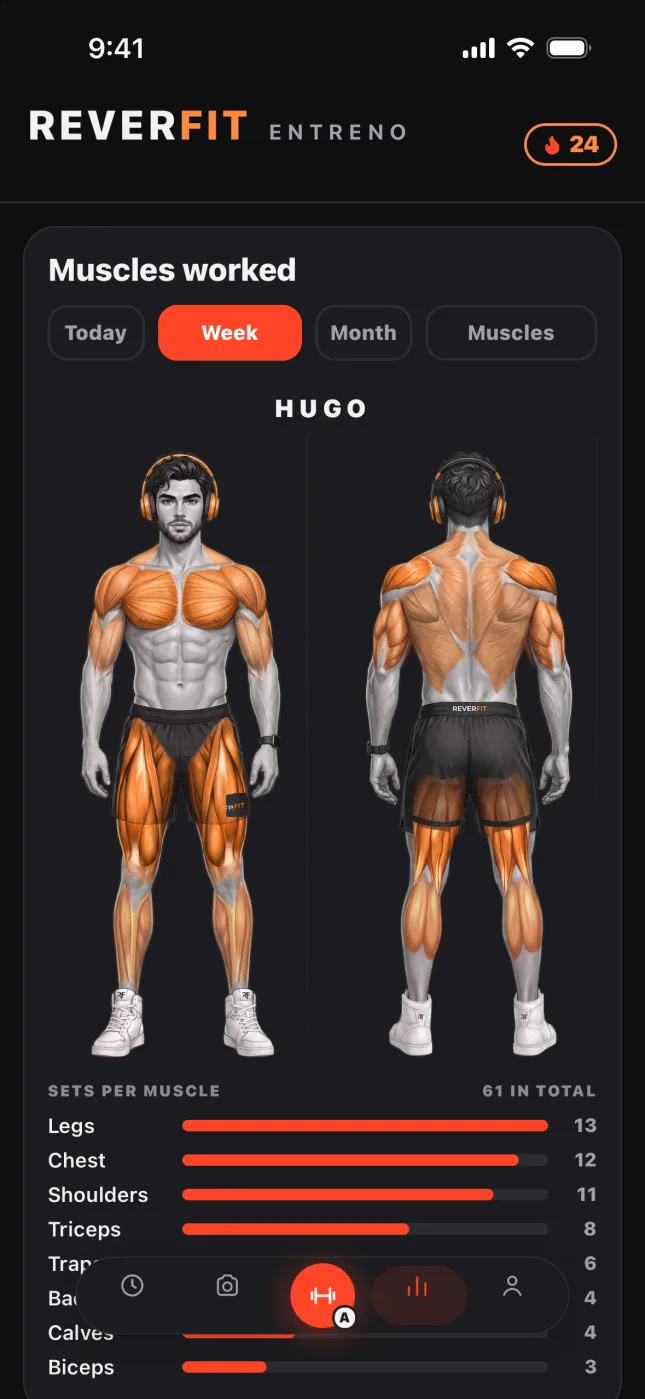
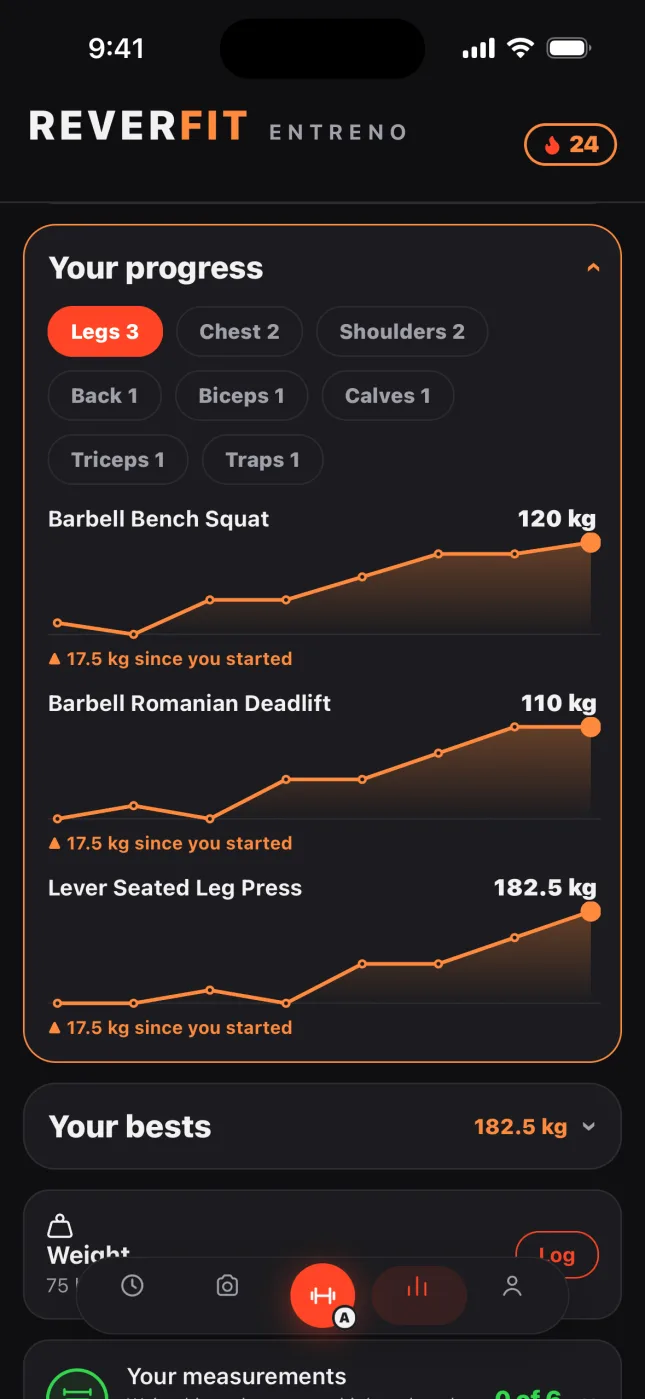
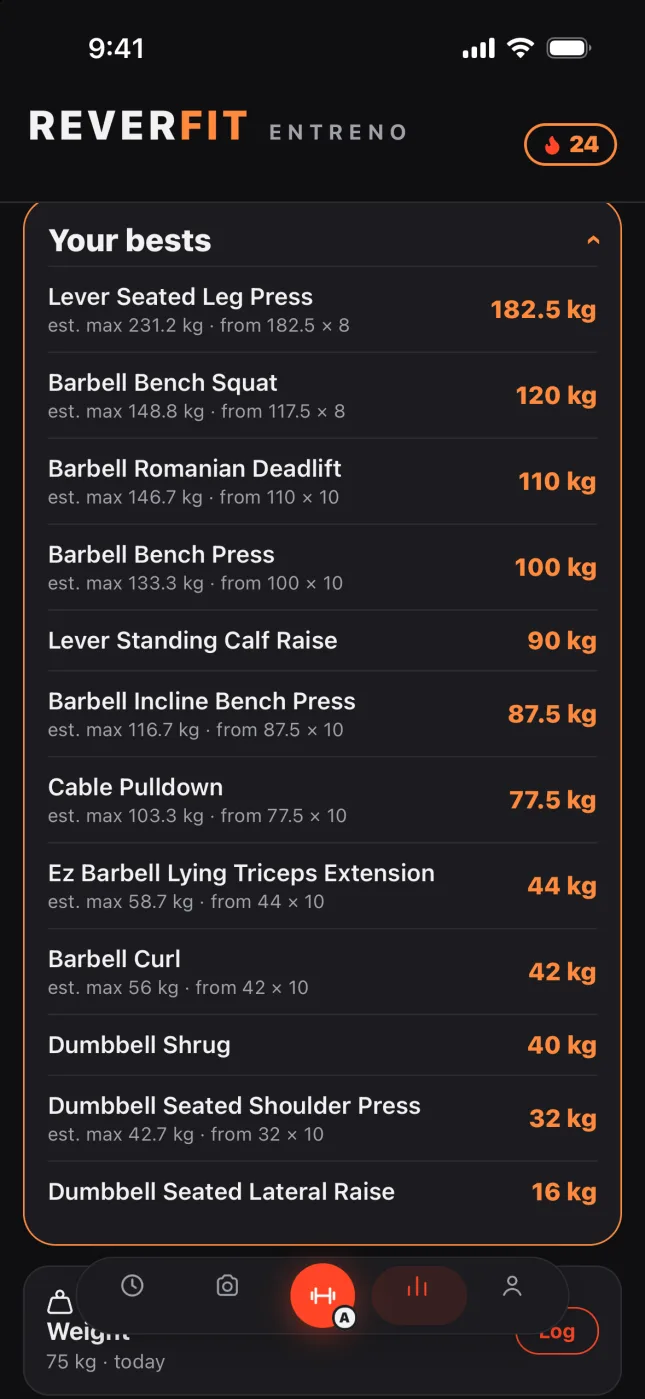
Reverfit Workout: today's session with the week at the topReverfit Workout: the exercise in progress, each set is a ring with its weight and repsReverfit Workout: the rest countdown between setsReverfit Workout: the map of the muscles worked this weekReverfit Workout: the progress curves of each exerciseReverfit Workout: the list of your bests by exercise

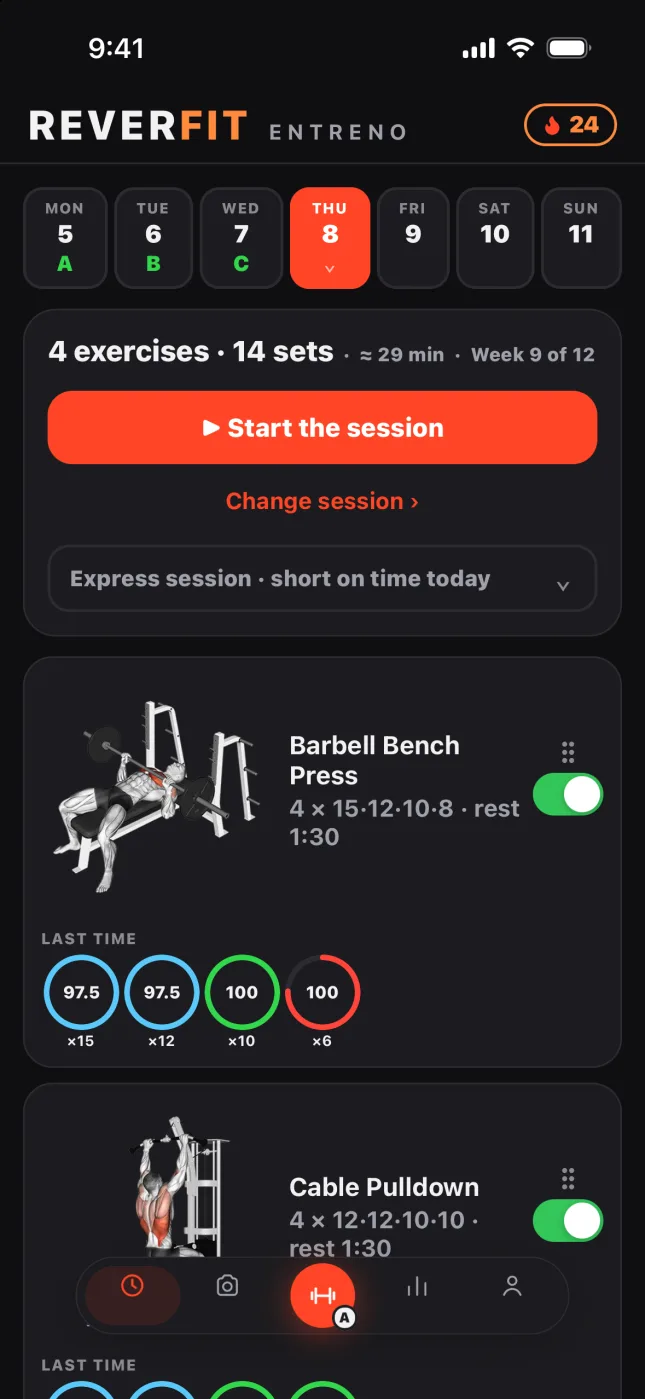
Here's today's session.

Your week at the top and today's session below, with its exercises, its sets and the rest. And if you don't feel like it today, change session without losing your plan.

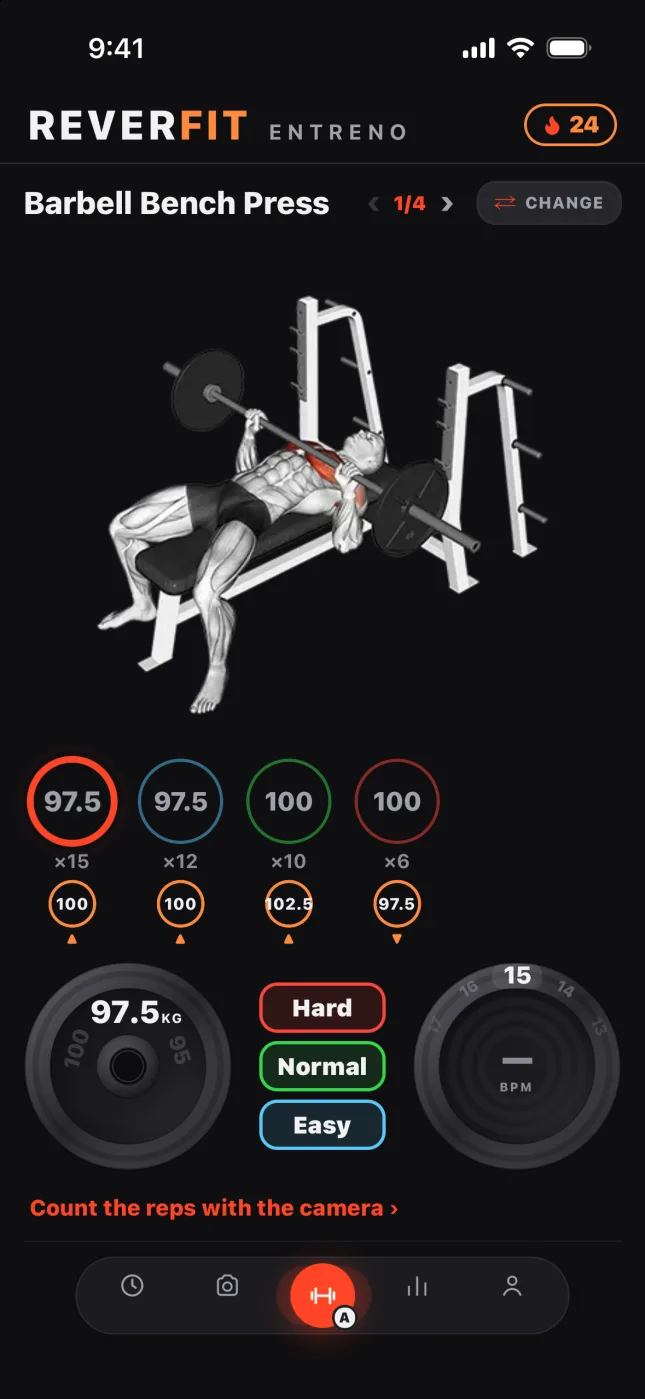
Each set, a ring.

You log the weight and the reps you really did, with what you did last time right in front of you. And when you finish, whether it was hard, fine or you had strength to spare.

Your rest, in view.

A big countdown and a strong alert when it ends, even with the screen locked. Below it, what's next: the next set and its weight.

What you've worked.

The muscles of the week and the month, lit up on the body, and how many sets each one has had. With Pro.

Watch it go up.

The curve of each exercise since you started, and what you've gained. With Pro.

Your bests.

Your best weight in each exercise and your estimated max: what you'd lift just once. With Pro.

Hugo and Nora

Hugo and Nora, on video.

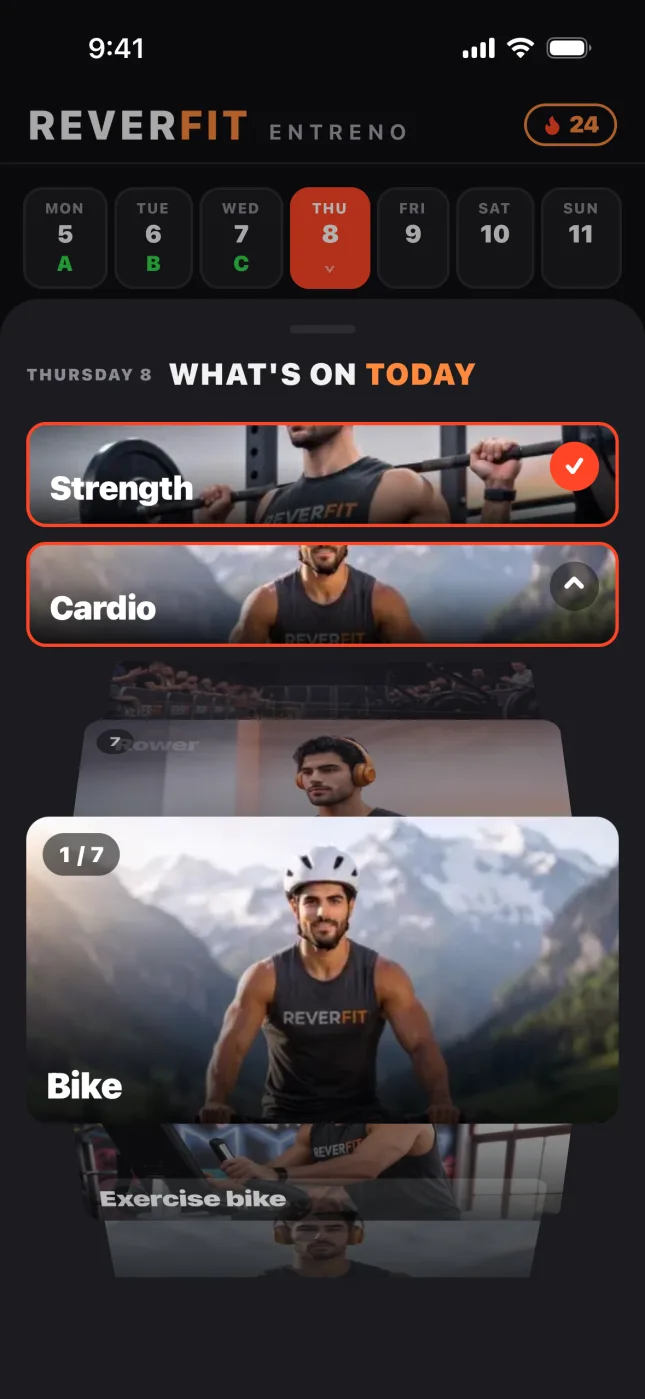
In cardio, our models do the exercise in front of you: running, the treadmill, the exercise bike and the elliptical, and also the bike, the rower and the ski erg. With Pro; strength exercises come with their animated drawing.

Running · Nora
Treadmill · Hugo
Exercise bike · Nora
Elliptical · Hugo

Hugo and Nora are our models, created with artificial intelligence.

On your wrist

Your workout, on your watch.

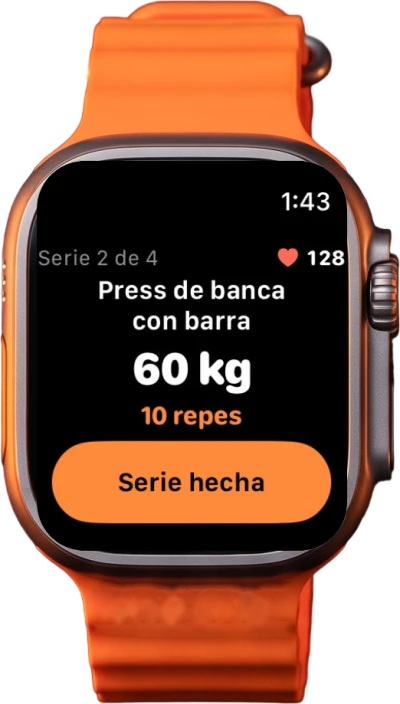
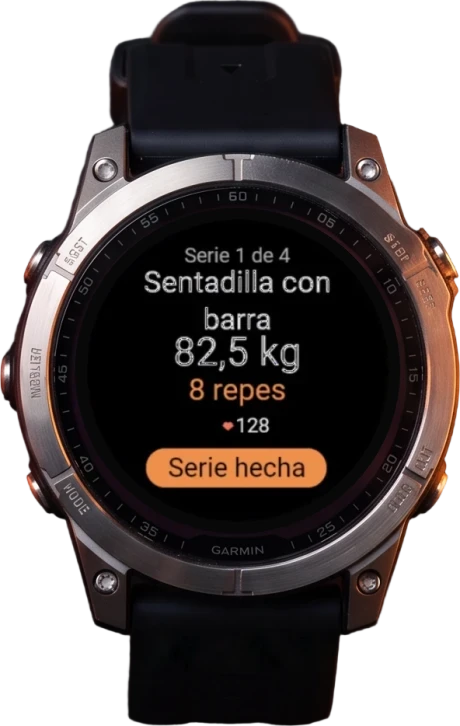
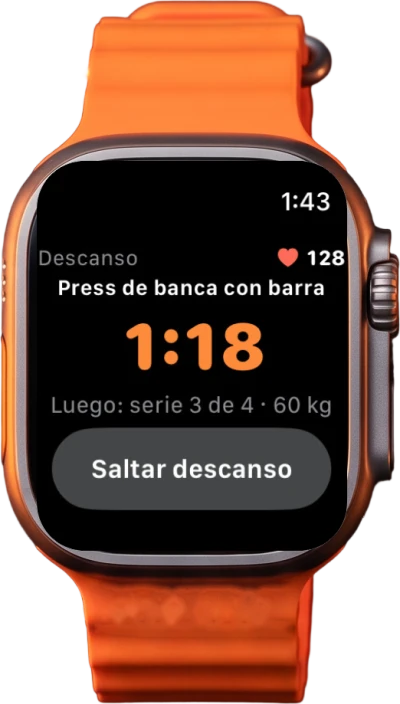
Log the set and skip the rest from your wrist, with your heart rate in view.

Reverfit Workout on the Apple Watch: the set with weight, reps and the Set done button
Apple Watch
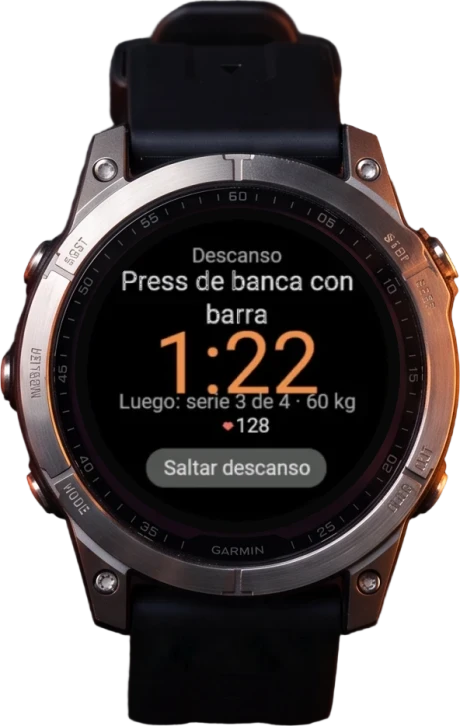
Reverfit on a Garmin watch: the set with weight, reps and heart rate
GarminComing soon
Reverfit Workout on the Apple Watch: the rest countdown
Apple Watch
Reverfit on a Garmin watch: the rest, with what comes next
GarminComing soon

The Apple Watch app is already in version 1.3.0. The Garmin app is under review in Garmin's store: as soon as it's approved, you'll have it.

The app’s guide

How it works

The same guide you have inside the app, in You › How it works.

01

The app at a glance

At the bottom you have five tabs: Today, Photo, Train, Progress and You. The middle button is Train, and it carries the letter of today's session. The bar shrinks while you read: tap it or scroll up and it opens.

At the top, in the header, the flame is your streak, and you also see it while training. If you see «No backup» in Progress, tap it and you go to your account.

Reverfit Workout: the Today screen
02

The colors: Hard, Normal or Easy

When you finish each set you tap how it went. Each word has its color and says how many reps you had left, what gyms call RIR:

  • Hard: none, or one.
  • Normal: two or three.
  • Easy: four or more.

Before you do it, the set is a thin ring with your last time: its weight, its reps and its color; if there is none, it takes the color the plan expects for that week. When you log it, the ring turns thick in the color you tap and closes according to the reps: if it asked for 12 and you log 10, a gap is left.

With Pro, below it goes the small ring, in amber, with the weight the app suggests: tap it and it goes on the dial. The first time you do an exercise it doesn't appear.

  • Up if it was Easy, or Normal and you reached the reps.
  • Repeat if it was Normal and you didn't reach them, or Hard and you did.
  • Down if it was Hard and you didn't reach them.

How much it goes up or down depends on the equipment, because not all of it takes the same weights:

  • On a weight-stack machine or a cable, where you pick the weight with the pin, in steps of 5.
  • With a barbell, a Smith machine or a plate-loaded machine, in steps of 2.5, which is what two 1.25 plates add up to.
  • With dumbbells, in steps of 1 up to 10 kg and of 2.5 from there on.
Reverfit Workout: the set with the Hard, Normal and Easy buttons
03

Today

Your week goes at the top: each day you train carries the letter of its session, and the plan moves forward when you start training, not with the calendar.

  • Tap today and in «What's on today» you choose your plan's session or something else, like running or the bike. If you choose something else you don't use up your session: tomorrow it comes up again.
  • Tap an upcoming day and you'll see, grayed out and just to look at, the session you'd have if you trained every day. Tap today to go back.
  • Before you start, if you're short on time, the express session keeps the basics with fewer sets and switches off the rest.
  • Press and hold an exercise to move it, or switch it off with its toggle and it stays «not today»: all of it, just for today.

«Change session», under the start button, shows you all the sessions in your plan with their names and exercises: you pick one and today becomes that one, and if you train, tomorrow you carry on with the one after it. If you had already logged sets nothing is lost: what's done stays and the new one opens separately, like a second workout of the day. It doesn't show if your plan has only one session, or with HIIT set from the day at the top, which isn't part of your plan and is changed right there, by tapping the day.

With the whole session done you get your score from 0 to 10, which looks at the sets you did, how they went and your new bests, and the comparison sets your kilos against the last time you did that session.

  • If this week you train more days than your plan says, you get «Extra day!».
  • With the session done, «Train again» opens the next one in the plan and saves the previous one, up to four workouts a day. If you leave it half done, «Move on to the session», under the button, does the same.
  • At the very bottom, the note for the day keeps how you felt.
Reverfit Workout: what's on today, with strength and cardioReverfit Workout: the Today screen
04

Train and log

Turn the dial for the weight and the wheel next to it for the reps, which start at the plan's, and tap Hard, Normal or Easy: the set is logged. Turn your phone sideways and you'll see the weight, the reps and the rest in big, to read it propped up; turn it upright to go back.

  • Between sets your rest runs, the one in You › Training, which applies to every exercise even if the plan says otherwise. With beeps on in You › Modes, its last five seconds beep.
  • If in that same place you switch the rest off with its toggle, there's no countdown: you carry on with the next set and, when you finish an exercise, you move to the next one by yourself; on the last one you're left with «finish the session». Mixed blocks and HIIT stay the same.
  • With Pro, tap the dial without turning it and the plate calculator shows you your bar with the kilos on each side. You change the bar by sliding it sideways, or in You › Training: the Olympic bar weighs 20 kg, the women's 15, the technique bars 10 and 5, or no bar.
  • With the pencil on a set already done you correct it, while the exercise is still in progress.
  • With ⇄ you swap the exercise for another one for the same muscle: «Just for today», and tomorrow the usual one comes back, or for good in your plan. Without Pro, one swap a day; with Pro, as many as you like.

What doesn't go by reps is logged like this:

  • Cardio: you choose the minutes and the ring counts down; when you finish you tap how it went and the minutes you did are logged.
  • Seconds and meters: with seconds there's a countdown and the ones you hold are logged; with meters a stopwatch runs until you tap «Done», and your time is logged.
  • Mixed: every few strength sets, counted in a row even if you change exercise, the app gives you a block of cardio, of abs or of both.
  • HIIT: after ten seconds to get ready, each exercise lasts what the block says, in order and with its rest, and the round repeats. It beeps in the last seconds, vibrates on each change and you can pause or skip a stretch; when you finish, the seconds worked in each round are logged.
  • Running and bike: you set the distance, tap Start and it times you; when you finish you can correct the kilometers, and you tap how it went.
  • With Pro, in cardio Hugo or Nora keep you company on video, depending on your sex: running, on the treadmill, on the bike, on the exercise bike, on the elliptical, on the rower or on the ski erg. Without Pro, their drawing.
  • Heart rate strap, with Pro: any Bluetooth chest strap works, and some wristbands with heart rate broadcasting on, and it connects in You › Training › Heart rate strap. For weights, the wrist fails: the chest is better.
Reverfit Workout: the exercise in progressReverfit Workout: the rest countdown
05

Your history

In Progress, the figure is shaded with each muscle's sets for today. With Pro, also for the week or the month, and in «Muscles» you tap one to see its exercises. Further down is the month in rings, one per workout:

  • Full: complete workout, in the color you tapped most that day.
  • Half done: you left sets out.
  • Two rings: you trained twice that day.

Tap a day and you see everything you did, just to look at: the past can't be changed. Without Pro the last three months open; anything older shows on the calendar but doesn't open, and nothing is deleted.

With Pro, in «Your progress» you get the curve of every exercise you've done on two days or more, and in «Your bests», your best weight and your estimated max: what you'd lift just once according to the Epley formula, weight × (1 + reps ÷ 30), an estimate and not a record.

The flame counts days, not workouts, and goes back to zero if too many days pass between one training day and the next. Depending on the days a week in your plan, what can pass between one and the next:

  • 2 days a week: up to 10 days.
  • 3 days a week: up to 8 days.
  • 4 days a week: up to 6 days.
  • 5 days a week: up to 4 days.

The overall ranking is voluntary: you join with an alias, only your totals go up and you leave whenever you like.

In Photo you take a photo or pick one from your library, and we put the brand, your streak and today's session along the bottom, or you get the card with your numbers. «Share» opens your phone's share menu and «Save the photo» leaves it in your gallery.

Reverfit Workout: muscles workedReverfit Workout: your progressReverfit Workout: your bests
06

Your plan

In You › Training, in «Plan in a minute» you choose the type —Strength, Mixed or HIIT—, the days, the time and, if you like, the muscles, and the app builds your routine with your level and your training goal; if either is missing, it asks you first, just once, and saves it in Your details. It uses exercises from the catalog with their drawing, you use it from today or save it in My plans, and then change whatever you like. In HIIT you get three blocks for your level, A, B and C, which rotate across your days. Without Pro, one Plan in a minute every eight weeks; with Pro, as many as you like.

In «My plans», tap the current plan to edit it, save it under a name or go back to week 1 without deleting your history; in «Plan progress», each full cycle through its sessions counts as a week. «Create a new plan» saves it empty in the list, with its sessions without exercises, and the one you're on doesn't change until you tap «Use» on another, which starts at its week 1. Three plans of your own are kept without Pro; the fourth, with Pro.

With the personal trainer, which is paid for and needs an account, someone on our team makes your plan and adjusts it with you by message; while they look after it, to change anything, you message them.

When editing a plan:

  • Weeks, sessions and days: the body is split across your sessions, A, B, C…, and you say how many days you come. If you come more days than there are sessions, the rotation carries on, and for the streak and the extra day what counts is how many days, not which ones.
  • Effort per week: each week is a ring you change with one tap between Normal, Hard and Easy. It's the thin ring you see while training.
  • Exercises: tap one to change its sets and reps, and swipe it left to remove it; press and hold a session's header to move it.
  • Moving a session: the letters stay put and what moves is their content, the name and the exercises, with your history behind them. If you move C to the first place, A becomes what C was. The order of the plan changes, but today's session doesn't: you choose that in Today, under «Change session».
  • Session type: in HIIT, each exercise is done for the work time, you rest and move to the next, and the round repeats for as many rounds as you set. Stations are legs by meters, one after another, each with its time, and whatever you add goes in meters. In a mixed session, the block's exercises carry «block» in front and whatever you add goes in as strength.
07

Your numbers and your details

What you answered at the start can be changed whenever you like in You › Your details, and the app won't ask you again.

  • Man or woman decides your drawings and whether Hugo or Nora keeps you company in the cardio videos.
  • With your date of birth, your age updates by itself, and in the calculations it's only needed if you train with a heart rate strap.
  • With your level and your training goal, «Plan in a minute» builds your plan.
  • Height doesn't go into Workout's calculations, but your personal trainer sees it, if you hire one.

What you use up in each session is an estimate, and without your weight it isn't calculated. Without a strap, it comes from your weight, the minutes and the type of exercise, and goes up if half your sets were Hard; with a strap, from your heart rate, your weight, your age and your sex, and in strength only the minutes with your heart rate in the green zone count.

08

Weight and measurements

Your weight is logged in Progress, in the Weight card, for today or for a past day; turning the weight wheel in You › Your details logs today's. One weigh-in is saved per day, and your weight becomes the most recent one: it's used to work out what you use up in each session, and in Progress you see its curve.

Body measurements are also logged in Progress, in «Your measurements»; in Your details you only see a summary that takes you there.

09

The other app

If you also use Reverfit Diet, what you train today appears there, in Today, with its minutes and the calories used. It's information: it isn't added to what you can eat, because these figures are generous and would eat into your deficit without you noticing.

For the two apps to talk to each other, sign in to both with the same email account; in your gym's app they already go together.

10

Your account and your backup

Without an account the app works just the same, but everything lives only on this phone: if you lose it or change it without a backup, there's no way back. With an account, which you create in You › Your details › Your account, your things are saved in the cloud, and on another phone you sign in with your email and get them back.

The same account works in Reverfit Diet and Reverfit Workout. If at the start you sign in with the one you already use in the other, the app makes use of what it already knows about you, like your date of birth, your weight or your height, and doesn't ask you again.

In «Backup»:

  • «Save a backup» opens the share menu to leave it in your notes or your files. The backup contains your plans, your workouts, your details and your settings, but not your account or your gym code.
  • «Bring a backup from another phone» replaces everything you have, so save yours first.
  • «Export as CSV», with Pro, gives you your sets in a table, which can't be used to bring them back.
  • If you kept your workouts in another app, you can paste the CSV that some of them export, and they're added to your history without deleting anything.
11

Free, trial and Pro

With Pro you get the small ring that tells you the weight for each set, the plate calculator, the map of your muscles for the week and the month with its «Muscles» mode, «Your progress» with the curve of every exercise and of your heart rate, «Your bests», your whole history from day one, the heart rate strap, Nora and Hugo's cardio videos and exporting your sets to CSV.

In the free version you can swap one exercise a day, have up to three plans of your own and one «Plan in a minute» every eight weeks, and you see today's map and your history from the last three months: older entries are not deleted and come back with Pro. Everything else is free: training and logging, the express session, changing session, the ranking, your weight and measurements, the photo and the backup.

You can try Pro for free through your phone's store and cancel whenever you like. In your gym's app, if your gym has Workout, Pro is paid for by your gym and everything is open to you.

12

Modes, alerts and sounds

In You › Modes you choose how the app looks: Light, Grey or Dark. Vibration is felt when turning the wheels and the weight dial, and on HIIT and mixed-block changes; the sound is the click of those same wheels and the dial.

The beeps sound in the last seconds of every countdown: the rest, cardio and sets by seconds, HIIT, the mixed-session block and activities with minutes.

With «Alerts and sounds» off, the app doesn't alert you or make a sound: the rest doesn't leave the app (not on the lock screen, not as a notification, not with the alarm at the end), the beeps and the wheel click go quiet, and the sets microphone answers you in writing only. The rest keeps running inside, in silence, and whatever you've chosen in Modes comes back as it was when you switch it on again. Vibration is separate.

On iPhone, if you train with an Apple Watch, the watch keeps alerting you at the end of each rest: to stop it, switch off rest between sets or put the watch on silent.

13

Your health

The app's figures are estimates: calories, your heart rate zones and the estimated max. If you have an injury or a health problem, mention it at your gym or see a professional before you start.