For gyms
Reverfit for gymsReverfit for boxesPricingFree
Your clients, your plans
and your brand on their phone
Each client's workout plan and diet on their phone, with your name inside the app, their session packs under control and what they train when you're not there, in plain sight. It was built by a personal trainer and gym owner for his own gym.
What eats your time outside sessions
If you manage your clients across spreadsheets, PDFs and WhatsApp, this will sound familiar.
- The plan travels as a PDF. You send it over WhatsApp, the client loses it among photos and voice notes, and when you change it you no longer know which version each one has.
- You don't know what they do when you're not around. Between sessions they have to train alone. Whether they do it, with what weight, or whether they've quit, you find out when it's too late.
- Session packs are counted from memory. Did they have three sessions left, or two? A notebook, a note on your phone or your memory: and the awkward conversation when it doesn't add up.
- The diet, from scratch every time. Each client weighs something different and eats differently, and redoing the same menu with other amounts is repeated work.
How it works here
What your client sees: today's session and what they lifted last time. Inside the app, with your name and your colors.
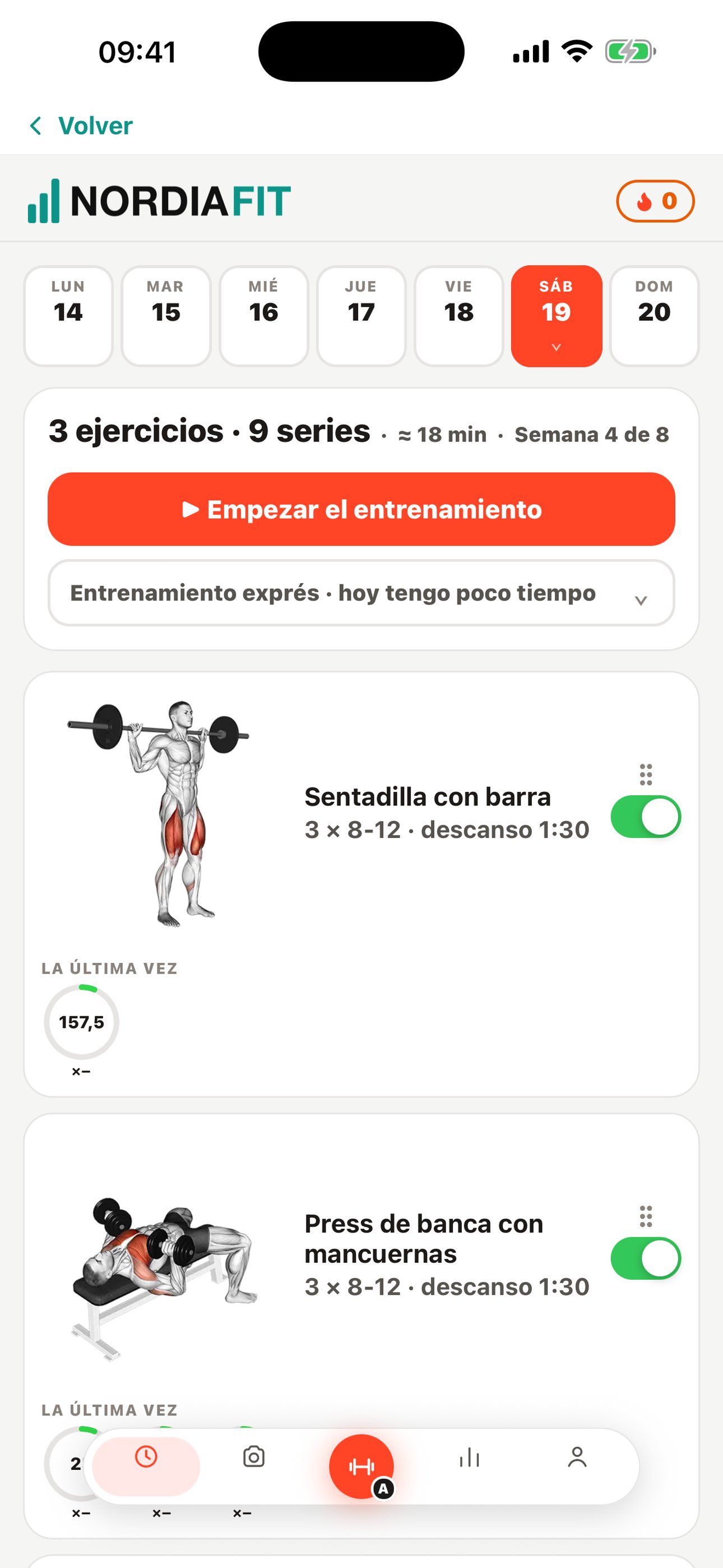
- You build the plan, exercise by exercise. With a catalog of 903 exercises, each with its illustration. You save it as a template and assign it to one or several clients at once, and it shows up in their app.
- The diet adjusts to each client. You build a week of menus and assign it: the amounts are recalculated to each person's calories. Without redoing the menu for every person.
- You see what they actually train. Which session each client has done and on what day, and the days they've logged their diet. You know who to message before they quit.
- Session packs count down on their own. You sell a ten-session pack and each visit takes one off. On your dashboard you see how many each client has left, and when they're down to two it shows up so you can let them know.
- Your name, inside their app. Inside the app your client sees your logo, your colors and your name as their trainer; the app is called Reverfit Member and has its own icon. They sign up from a link, sign their contract on their phone and they're on your list.
What it doesn't do yet
It has no calendar for one-on-one appointments: if you run small-group sessions, you set them up as classes with their spots, but a one-on-one slot calendar is still something you keep separately today. It doesn't charge clients online either: memberships and packs are recorded when you collect them yourself, in cash, by bank transfer, Bizum or card. And there's no chat inside the app: you talk to each client over WhatsApp, one tap from their profile.
Frequently asked questions
Does it work if I don't have my own gym?
Yes. Whether you train in your studio, in someone else's gym, at people's homes or in the park: what you sign up are your clients, and they have their app wherever they are.
Do my clients have to download anything?
They download Reverfit Member for free from the App Store or Google Play and sign in with the code you give them. The icon is Reverfit Member's; once inside they see your name, your logo, your colors and your announcements. No passwords to forget.
Can I use my own exercises and menus?
You build your plans with the exercises in the catalog, all 903 of them, and your weeks of menus with the foods you choose. If you already have them written down, you can paste them in and the software recognizes the exercises and foods it finds; whatever it doesn't recognize, you pick yourself.
How much does it cost?
The first year, $49 a month for management, $59 for training and $89 for all three modules; from the second, $59, $69 and $99. No VAT. The price is flat: it doesn't go up when you have more clients.
Is there a lock-in period?
No. You try it for seven days with sample clients, no card, and if you stay, you leave whenever you want.
Keep reading
- Flat price, no per-member fees. Management software for your gym at a flat monthly price: 60 members or 600, it costs the same. Run the numbers with this month's bill and compare.
- Boxes and functional training. Workout of the day, whiteboard with RX and scaled, PRs, the gym TV and bookings with a waitlist. Memberships by direct debit or Bizum. A flat price per box.
- Combat sports and martial arts. Boxing, kickboxing, jiu-jitsu, judo, karate or MMA: each discipline with its schedule and capacity, family memberships and passes, and entry control. Flat price.
- Pilates and yoga studios. Limited spots per class, session packs with their counter, an automatic waitlist and fees collected without chasing. With your studio's name. Flat price.
- The management software, inside. The modules, what each one does and the prices.
- How to collect your gym's membership fees. SEPA direct debit step by step, the 14-day notice, the 8-week refunds, cards, cash, and what Spanish law says about cancellations and fee increases.
- How much gym software costs. The prices each program publishes in 2026, the three ways they charge (per member, per gym or by quote) and what the price leaves out: the app with your brand, the fees and the migration.
- How to switch gym software without losing anything. What to ask your current program for before you leave, what data to take with you (members, fees, payments, photos and SEPA mandates) and how to switch without interrupting payments.
Build a plan for a client and take a look
A seven-day trial with sample clients, no card and no lock-in. Assign them a plan and a diet, and see how it reaches their phone.
Try it free for 7 days‹ See the modules and prices