For gyms
Reverfit for gymsReverfit for boxesPricingFree
Your mats full,
and fees up to date
Each discipline with its schedule, room and capacity; students book from their phone and you know who's coming to each class. And memberships, class packs and family discounts, handled without a notebook.
What gets done by hand at a school
Whatever the discipline: if you handle this on paper or in a group chat, it'll sound familiar.
- Several disciplines, one set of mats. Boxing at seven, jiu-jitsu at eight, kids on Saturdays. When you change a time, half the school finds out.
- Classes that fill up and classes that are empty. The evening class can't fit anyone else and the morning one has three students. Without bookings, you don't know who's coming until they arrive.
- Siblings, parents and kids. Half a family trains with you and each pays something different. Keeping track of who has a discount and who has paid never adds up the first time.
- Injuries and summer. A student gets injured or goes away for two months. Freezing their membership and remembering when they're back ends up as a note on your phone.
How it works here
What your student sees: the week's classes with their open spots, and booking or canceling with one tap. With your school's brand.
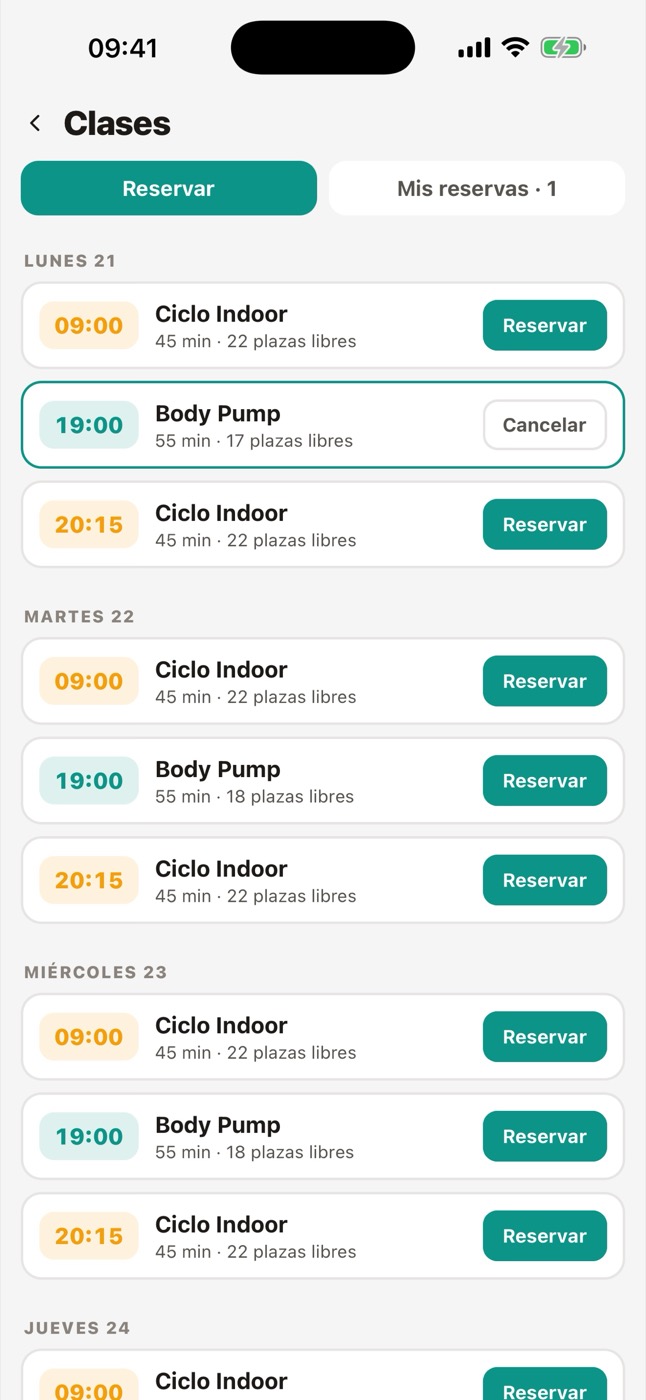
- Each discipline, with its schedule and capacity. You set up your fixed timetable with its activities, each with its color, room and spots. The coming weeks are created automatically, and students book from their phone.
- Waitlist and no-shows. If a class fills up, the next person goes on the waitlist and gets a notification when a spot frees up. And if you want, no-shows are recorded for those who book and don't come.
- Monthly membership or class pack, with a family price. Each membership can be by time or by number of classes, and carry a family price you apply when you charge. Siblings are grouped in the same family.
- Pauses for injury or summer. You freeze the membership from the student's profile and, when they come back, the renewal shifts on its own with the days they had left.
- Who comes in, with their code. The student shows the code on their phone at the entrance, or you look them up at the front desk. If their membership is overdue, you see it right then.
What it doesn't do yet
It doesn't track ranks, belts or gradings: each student's history in their art is still something you keep separately. It doesn't handle federation licenses or sports insurance either. Online sign-up is signed by the person signing up: for minors, the contract with the signature of a parent or guardian is still done on paper.
Frequently asked questions
Can I have several disciplines with different prices?
Yes. Each membership has its own name and price (boxing, jiu-jitsu, kids, all disciplines) and each activity its own schedule and capacity.
Does it work for kids' classes?
Yes, as one more activity, with its schedule and spots. What there isn't is an online sign-up designed for minors: you sign up the kids yourself from the front desk.
Do my students have to download anything?
They download Reverfit Member for free from the App Store or Google Play and sign in with the code you give them. The icon is Reverfit Member's; once inside they see your school: your logo, your colors and your announcements. No passwords to forget.
How much does it cost?
The first year, $49 a month for management, $59 for training and $89 for all three modules; from the second, $59, $69 and $99. No VAT. It's per school: it doesn't go up when you have more students.
Can I bring over the students I already have?
Yes. If you have them in a spreadsheet or can export them from your software, they're loaded in one go with their memberships and dates.
Keep reading
- Flat price, no per-member fees. Management software for your gym at a flat monthly price: 60 members or 600, it costs the same. Run the numbers with this month's bill and compare.
- Boxes and functional training. Workout of the day, whiteboard with RX and scaled, PRs, the gym TV and bookings with a waitlist. Memberships by direct debit or Bizum. A flat price per box.
- Personal trainers. Your clients with their workout plan and diet on their phone, your name in the app, their session packs and what they train in plain sight. Flat price.
- Pilates and yoga studios. Limited spots per class, session packs with their counter, an automatic waitlist and fees collected without chasing. With your studio's name. Flat price.
- The management software, inside. The modules, what each one does and the prices.
- How to collect your gym's membership fees. SEPA direct debit step by step, the 14-day notice, the 8-week refunds, cards, cash, and what Spanish law says about cancellations and fee increases.
- How much gym software costs. The prices each program publishes in 2026, the three ways they charge (per member, per gym or by quote) and what the price leaves out: the app with your brand, the fees and the migration.
- How to switch gym software without losing anything. What to ask your current program for before you leave, what data to take with you (members, fees, payments, photos and SEPA mandates) and how to switch without interrupting payments.
Set up your week and take a look
A seven-day trial with sample students, no card and no lock-in. Set up your disciplines with their schedule and watch how they book.
Try it free for 7 days‹ See the modules and prices